写在前面:
在平时做项目的时候,我们时常会需要根据不同的环境,使用相对应的变量,比如:像我们就有正式环境、开发测试环境(本地),将来获取还会有测试服务器。而每个环境访问的服务器是不一样的,还有我们还可能在不用的环境或者版本上使用不同的资源,对应这些情况我们不可能每次打包的时候都要手动去修改代码,然后Gradle强大的功能可以解决我们的困扰。
Gradle的配置如下:
一、统一管理:
在项目根目录的gradle文件添加如下配置(可直接复制到自己项目,做相应修改即可直接使用),在Moudle的Gradle中引用:
ext {
    versionCode = 225//版本号
    versionName = "2.2.5"//版本名
    minSdkVersion = 10//支持最低SDK版本
    targetSdkVersion = 23//目标SDK版本
    compileSdkVersion = 23//编译SDK的版本
    buildToolsVersion = "23.0.2"//编译tools的版本
    supportLibraryVersion = '24.2.0'//依赖库版本
     ... ...
}
二、项目Moudle的gradle文件配置:
这里的配置有两种,统一版本的引用是一致的,我们不做解释。重点是productFlavors中的配置
- 可以使用resValue “string”, “app_name”, “Your App Name”:第一个参数是strings.xml中的string节点 ,第二个参数是string节点的变量名,第三个参数是string节点的值;
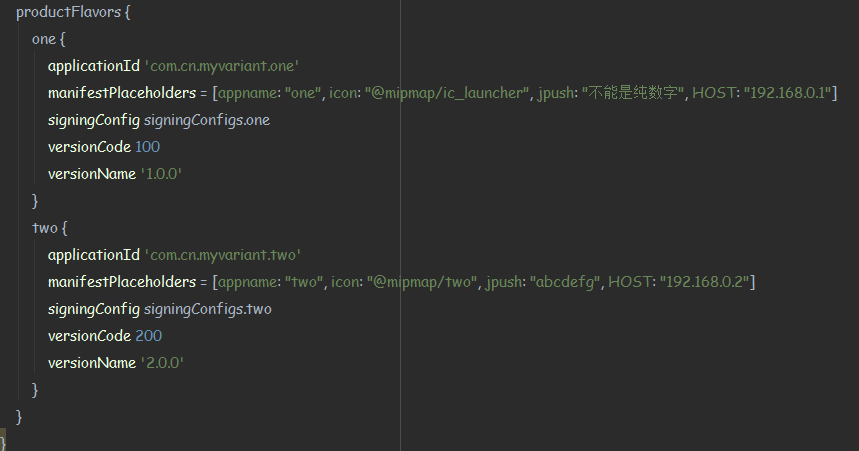
- 可以使用buildConfigField ‘String’, ‘URL’, ‘“你要定义的值”‘:第一个参数是数据类型 ,第二个参数是变量名,第三个参数是值 manifestPlaceholders = [appname: “替代的内容”, icon: “替代的内容 (@mipmap/ic_launcher”), jpush: “替代的内容”, HOST: “替代的内容 “]
def releaseTime() {
	return new Date().format("yyyy_MM_dd_HH_mm")
}
android {
//编译SDK的版本
compileSdkVersion rootProject.ext.compileSdkVersion
//编译tools的版本
buildToolsVersion rootProject.ext.buildToolsVersion

defaultConfig {
    applicationId "your app Id"
    minSdkVersion rootProject.ext.minSdkVersion
    targetSdkVersion rootProject.ext.targetSdkVersion
    versionCode rootProject.ext.versionCode
    versionName rootProject.ext.versionName
}

  //打包命名
android.applicationVariants.all { variant ->
    variant.outputs.each { output ->
        def outputFile = output.outputFile
        if (outputFile != null && outputFile.name.endsWith('.apk')) {
            //这里修改apk文件名
            def fileName = "yc_pos_${defaultConfig.versionName}_${variant.productFlavors[0].name}_${releaseTime()}.apk"
            output.outputFile = new File(outputFile.parent, fileName)
        }
    }
}
//buildTypes
buildTypes {
    release {
        minifyEnabled false
        proguardFiles getDefaultProguardFile('proguard-android.txt'), 'proguard-rules.pro'
    }
}
//产品渠道
productFlavors {
    release_Flavors {
        resValue "string", "app_name", "悦餐POS"
        buildConfigField 'String', 'URL', '"http://yuecaninfo.com/services/api_pos.php"'
        buildConfigField 'Boolean', 'IS_DEBUG', 'true'
        buildConfigField 'String', 'BASE_URL', '"http://yuecaninfo.com/app/"'
        signingConfig signingConfigs.release
    }
    pos251_Flavors {
        resValue "string", "app_name", "251悦餐POS"
        buildConfigField 'String', 'URL', '"http://192.168.0.251/services/api_pos.php"'
        buildConfigField 'Boolean', 'IS_DEBUG', 'true'
        buildConfigField 'String', 'BASE_URL', '"http://192.168.0.251/"'
        signingConfig signingConfigs.release
    }
    pos105_Flavors {
        resValue "string", "app_name", "105悦餐POS"
        buildConfigField 'String', 'URL', '"http://192.168.0.105/services/api_pos.php"'
        buildConfigField 'Boolean', 'IS_DEBUG', 'true'
        buildConfigField 'String', 'BASE_URL', '"http://192.168.0.251/"'
        signingConfig signingConfigs.release
    }
}
compile "com.android.support:appcompat-v7:$rootProject.supportLibraryVersion"

}
三、解释:
- ext中的值可供各个Modle调用,保证版本统一管理(可自行添加)
- defaultConfig.versionName,获取版本名
- variant.buildType.name,获取该buildType的名称,如release、debug等
- variant.productFlavors[0].name,获取产品渠道productFlavors的名称,如release_Flavors、pos251_Flavors
- productFlavors第一种配置获取其中的变量的方法:Sync now 后回生成BuildConfig.class,调用BuildConfig.URL等即可。
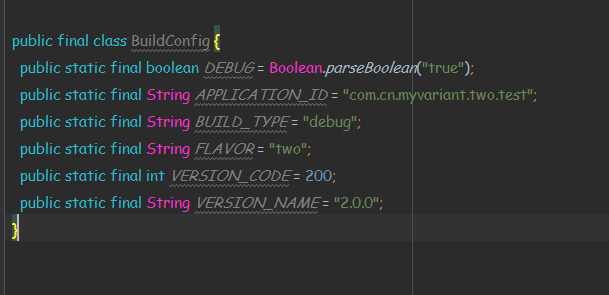
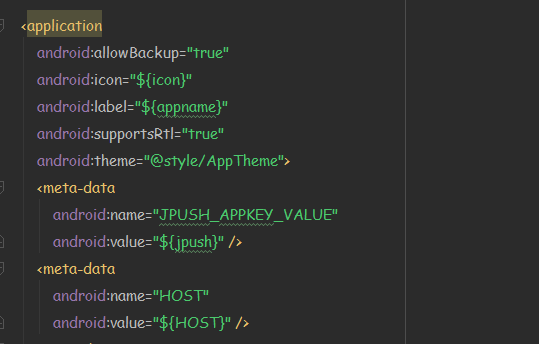
- 第二种配置则是在清单文件的application节点下meta-data中做配置,代码中获取即可,Gradle配置如下:
清单文件的配置如下(接着第二种配置):
最终在项目代码中使用如下:

PS: 获取meta-data配置的变量,application和Activity调用的是getXxx Info(getPackageName(),PackageManamger.GET_META_DATA)方法;Service、Receive调用的是getXxxInfo(new ComponentName(this,YourXxx.class),PackageManamger.GET_META_DATA)
写在最后:
如何正确使用Gradle,能很大程度上提高我们的开发效率。作为一名程序猿,谁不想偷把懒。
